Execute
Run repository tasks
Edit files, run terminal commands, call MCP tools, route across models, and coordinate coding-agent workers.
Graff · Open-source AI coding harness
Graff connects your model to your repository, runs coding tasks, and checks the result.
Use your Codex, Kimi or Grok subscription, or another supported provider.
Apple Silicon · macOS 14+Other downloads
curl -fsSL https://github.com/justrach/codegraff/releases/latest/download/install.sh | sh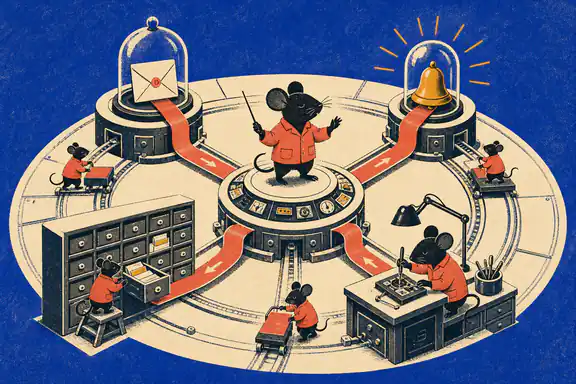
From model to working environment
A coding agent harness connects a model to repository context, file edits, terminal commands and tests. It manages the steps between a task request and the resulting code.
Execute
Edit files, run terminal commands, call MCP tools, route across models, and coordinate coding-agent workers.
Evaluate
Score success, cost, speed, tool errors, and verification evidence instead of trusting a confident final message.
Improve
Keep higher-fitness prompts and agent strategies so future runs reuse what worked while preserving useful diversity.
Graff records how strategies perform and uses those results to select future configurations. You can inspect the code, evaluation setup and recorded outcomes.
20/21
terminal passes · Graff / Grok 4.6
17/21
terminal passes · Graff / Kimi K3
$0.31
per pass · recorded Grok run
$0.21
per pass · recorded Kimi run
Later FrontierHarness runs on the selected 21-task terminal slice, with extra evaluation instructions. Cost per pass uses historical list-price totals and includes failed attempts. Explore the results and comparison conditions →
Graff's core loop

Graff turns completed work into a fitness signal, keeps a diverse archive of strong strategies, and uses that archive to guide future runs.
Graff samples agent strategies and runs them against real repository work.
Record completion, cost, time and errors for each strategy.
Store selected variants in a MAP-Elites archive, grouped by task and provider class.
Future runs sample stronger strategies more often while preserving useful diversity.
Graff owns the evolutionary loop. CodeDB improves what Graff or another coding agent can see. CodeDB Pro accelerates repeated local tool work.
Use Graff to run coding tasks, CodeDB to find relevant code, and Pro to batch local reads and edits. Graff and CodeDB can each work independently.
EVOLVE
Free · open sourcegraff
Connect your model and tools, run repository tasks, and evaluate which strategies complete the work.
MAP
Free · independentCodeDB
Local structural code intelligence that works with Graff or another supported coding agent. It maps symbols, outlines, callers, and dependencies.
MOVE
Paid upgradeCodeDB Pro
Keep a local daemon ready for repeated searches, reads, diffs and edits. Address changes by symbol name.
Graff and CodeDB are free and open source. CodeDB Pro is an optional paid upgrade.
Compare a whole-file read, a CodeDB outline and a Pro edit. Each example shows what the agent asks for and what the tool returns.
See the measured calls ↓Structural lookup
$ codedb outline src/auth.ts

→ SessionStore       L18
→ validateToken      L61
→ handleAuth         L94
→ refreshSession     L137
  exact scope found
Context returned
47 tokens
8 symbols mapped
The result changes with the tool. The task does not.
CodeDB · Free local code intelligence
Give your agent a map of definitions, callers and dependencies. CodeDB runs locally and connects over MCP, so you can keep the coding client you already use.
curl -fsSL https://codedb.codegraff.com/install.sh | bash
Works out of the box with Claude Code, Codex, Gemini CLI, Cursor, Windsurf, Devin.
See the CodeDB search guide or read how local code intelligence reduces agent context.

Step 01
CodeDB gives the client likely files, symbols, dependencies, and focused source excerpts.
codedb context "fix session refresh"Step 02
Outline maps the file first. Symbol reads pull the exact definition instead of pouring the whole file into context.
codedb symbol refreshSession --bodyStep 03
Callers and dependency lookups show the agent what the change can affect before it edits anything.
codedb callers refreshSessionMeasured on one 2,318-line file
One real 2,318-line file measured three ways. Results vary by repository and task, so the methodology stays visible.
Understand a 2,300-line file
29× leaner than the raw dump
865 tok
with CodeDB Pro
Search the whole codebase
codedb’s search engine ships inside Pro
built in
with CodeDB Pro
Edit one function
Pro only · codedb reads, it doesn’t edit
1.9 KB
with CodeDB Pro
codedb-pro 0.2.9 · same 2,318-line file · raw read vs structural read vs exact symbol
Same query
6.4×
faster on a 4.7 GB repo
hyperfine · macOS arm64 · n=10
The toolchain stays warm instead of paying process startup on every call.
one local process
Read, search, diff, and edit in parallel over one request.
10 reads in 7ms
Target functions by name, guard the revision, and verify the write on disk.
1.9 KB vs 169 KB
Purpose-built local tools for search, reads, patches, diffs, memory, and parallel work.
search · read · edit · verify
CodeDB Pro is a local daemon with zero runtime dependencies on supported binaries. Tool operations do not send code, paths, queries, edits, or results to a remote MCP host.
Supported clients: Claude Code, Codex, Gemini CLI, Cursor, Windsurf, Devin.
graff and CodeDB remain free. Pro is an annual local-tooling license with a 14-day refund, keys by email, and no auto-renew lock-in.
Individual
$99
per year · 1 seat
All tools, every supported editor, one engineer.
Team
$160
per year · 2 seats
$80 per seat. Save $38 versus two solo licenses.
Engineering organization · 10+ seats
Volume pricing, annual invoicing, and MSA on request.
The later FrontierHarness runs passed 20 of 21 selected terminal tasks with Grok 4.6 and 17 with Kimi K3. Both used additional evaluation instructions. These are results for that task slice and setup, not full Terminal-Bench leaderboard scores. The comparison article includes costs, DeepSWE outcomes, source records and evaluation conditions.
Codegraff is the project behind Graff, a free, open-source AI coding harness. Graff runs repository tasks with your model and tools, evaluates results, and reuses selected strategies. CodeDB adds local code search and context. CodeDB Pro adds batching and editing tools.
A coding agent harness connects an AI model to the tools it needs to work: repository context, file edits, terminal commands and tests. It also manages execution and records outcomes. Graff combines that execution layer with evaluation and strategy selection.
Graff evaluates agent variants and stores selected strategies in a MAP-Elites archive. Later runs can draw on those strategies while continuing to explore alternatives. Selection changes the harness configuration; the base model weights stay the same.
Yes. CodeDB connects over MCP to supported clients including Claude Code, Codex, Gemini CLI, Cursor, Windsurf and Devin. You can use it with Graff or your existing coding agent.
Yes. CodeDB is free and open source. CodeDB Pro is an optional paid upgrade with a persistent local daemon, batched operations and symbol-safe editing.
CodeDB and Pro process repository data locally. Their tool operations do not upload code, paths, queries or edits to a remote MCP host. Your coding agent may send context to its model provider; that is a separate data path.
No. CodeDB speaks MCP and works with Claude Code, Codex, Gemini CLI, Cursor, Windsurf, and Devin. Remove it and your agent falls back to its built-in tools.
The current Pro binaries support macOS arm64 and Linux x86_64 with zero runtime dependencies.
Download the macOS app or install the CLI, connect a supported model provider, and give Graff a task. Start with a change whose result you can check with your own tests.